The 5 Pillars of a High‑Trust Power BI Ecosystem
From Data Modelling to Governance

High‑trust analytics isn’t just about flashy visuals—it’s the nexus of five disciplines working in unison: Data Modelling, Data Transformations, User Experience, Power BI Best Practices, and Governance. Nail these, and you’ll deliver solutions that are fast, adopted, and sustainable.
Why Trust Is the Real KPI
If stakeholders don’t trust the numbers, your dashboard becomes decoration. Trust is earned through consistency, clarity, and controls—which come from your technical foundations (modelling and transformations), your delivery approach (Power BI best practices and UX), and your operating model (governance). This post unpacks how each pillar contributes—and how to level up if you’re scaling from a single report to an enterprise ecosystem.
Who this is for: Power BI developers, data leads, analytics managers, and anyone shaping a self‑service BI practice.
Pillar 1: Dimensional Modelling — The Foundation of Reliable Insight
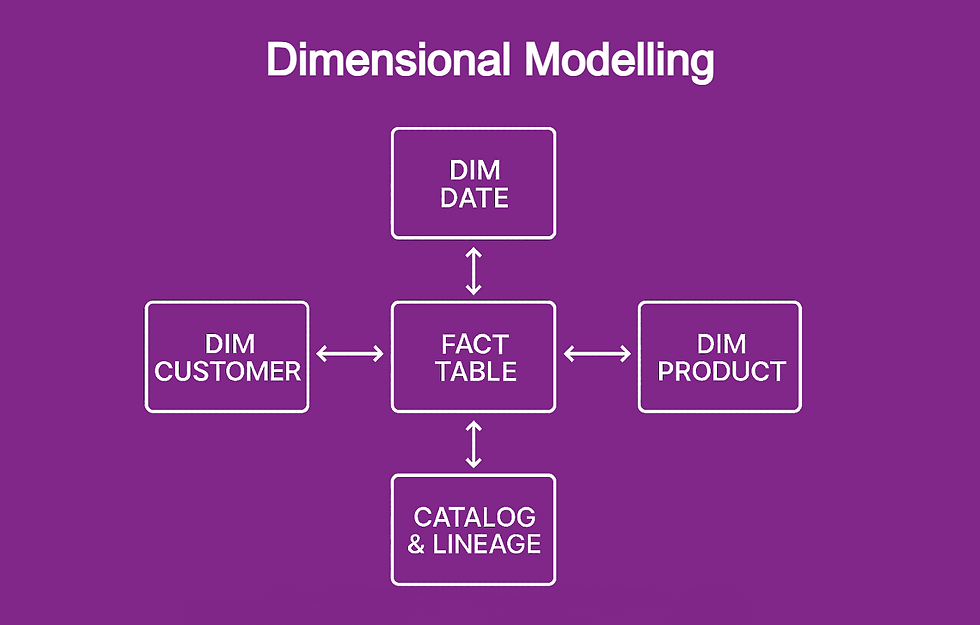
A strong dimensional model prevents downstream chaos. It standardizes definitions, eliminates duplication, and unlocks performance.
What “good” looks like:
Prefer star schema (fact tables + conformed dimensions) for analytic workloads.
Keep relationships simple and intentional—avoid many-to-many unless necessary.
Separate measures from columns; centralize business logic in the semantic layer.
Define grain clearly; don’t mix grains in a single fact.
Practical patterns:
Use Dimensions for shared entities (Date, Customer, Product).
Encapsulate business logic in explicit DAX measures (e.g., Total Sales, Active Customers).
Establish a KPI catalog that maps DAX measures to business definitions.
Common pitfalls:
Snowflaked dimensions that overcomplicate relationships.
Hidden circular logic in calculated columns.
Letting every report redefine the same KPI differently.
Quick win: Create a “Thin Report” pattern: one certified dataset powering many reports, ensuring a single source of truth.
Pillar 2: Data Transformations — Clean, Documented, and Repeatable

Great analytics starts with clean inputs and a repeatable pipeline. Power Query/M is your workhorse.
What “good” looks like:
Stage data in layers: Raw → Staging → Curated (Model‑ready).
Avoid row-by-row custom functions for large datasets; push down work to the source when possible.
Use parameters for environments (Dev/Test/Prod) and query folding to keep things fast.
Add inline step comments and document assumptions.
Practical patterns:
Create reference queries so shared logic is defined once.
Normalize semi-structured inputs (CSV/JSON) early and validate schema.
Instrument with row counts and quality checks (e.g., null rate, duplicates).
Common pitfalls:
Mixing business rules into data extraction logic.
Overusing Excel as a persistent “staging” layer.
Silent schema drift causing refresh failures.
Quick win: Introduce a Data Quality Summary table in Power BI to surface row counts, null checks, and freshness on the report itself—so issues are visible, not buried.
Pillar 3: User Experience — Design That Drives Adoption

Accuracy isn’t enough; users must want to use it. Good UX reduces cognitive load and speeds decision-making.
What “good” looks like:
Clear visual hierarchy: one primary insight per page.
Consistent layout, spacing, and typography across reports.
Accessible color contrast and descriptive alt text/tooltips.
Reduce “filter confusion” with intentional slicers and reset states.
Practical patterns:
Use a design system for Power BI (page templates, color tokens, card styles).
Provide explainers: “How to Read This Page,” metric definitions, and FAQ.
Use Bookmarks for guided insights (e.g., “Drill into churn drivers”).
MAD Framework based workflow:
Build a suite of tools based on the existing processes that the business already has.
Start with a summarised view to identify issues.
Enable the business to investigate.
Common pitfalls:
Visual overload—too many charts, not enough narrative.
Dark mode themes with low contrast on critical visuals.
Ambiguous filters leading to “Why don’t my numbers match?” questions.
Quick win: Add a “Metric Glossary” page linked from report header icons. It slashes the “what does this mean?” tickets.
Pillar 4: Power BI Best Practices — Performance and Scale

Treat Power BI like a product, not a file. Design for performance, reuse, and lifecycle.
What “good” looks like:
Centralized, certified datasets; thin reports for consumption.
Incremental refresh for large facts; composite models only with intent.
DAX hygiene: variables, SUMX only when needed, avoid iterators on large tables.
Deployment pipelines and versioning for predictable releases.
Practical patterns:
Separate model and report ownership to improve throughput.
Monitor with refresh telemetry and query performance (Performance Analyzer).
Use Shared/Managed workspaces with clear roles and naming conventions.
Common pitfalls:
Everything in one PBIX (model, report, and ETL).
Refresh bottlenecks from non-folding Power Query steps.
Siloed datasets that duplicate logic and cost.
Quick win: Introduce a “Gold/Silver/Bronze” classification for datasets and reports to set expectations for quality and support.
Pillar 5: Governance — Empowerment With Guardrails

Governance isn’t red tape; it’s the operating model that enables safe self‑service.
What “good” looks like:
Defined roles and responsibilities (Admins, Dataset Owners, Report Authors, Data Stewards).
Data sensitivity labels, access reviews, and least-privilege sharing.
Lineage and cataloging so people can find, trust, and reuse assets.
Standards for naming, documentation, and environments.
Practical patterns:
Establish a BI Review Board for certified datasets and UX standards.
Provide starter kits: themes, templates, DAX library, glossary pattern.
Set up scheduled access recertification and orphaned dataset checks.
Publish a “How We Do BI” guide—small, actionable, and kept current.
Common pitfalls:
One-size-fits-all lockdowns that kill self‑service.
No clarity on what’s certified vs. experimental.
Tribal knowledge replacing documented standards.
Quick win: Launch a Governed Self‑Service Playbook (10–12 pages) and a monthly Office Hours—support adoption without becoming a bottleneck.
Call to Action
If you’re building toward a high‑trust Power BI ecosystem, start with one pillar. Pick a thin‑report pattern, publish a mini glossary, or standardize a theme. Then expand. If you want a starter kit (theme JSON, template PBIX, glossary page, and governance checklist), I can generate it for you—just say the word.
